Quickstart
The rigorous way to fail-proof software development with AI contextFlow.
You do not need to memorize these docs. The system guides you.
- Drop the files into your project root.
- Add
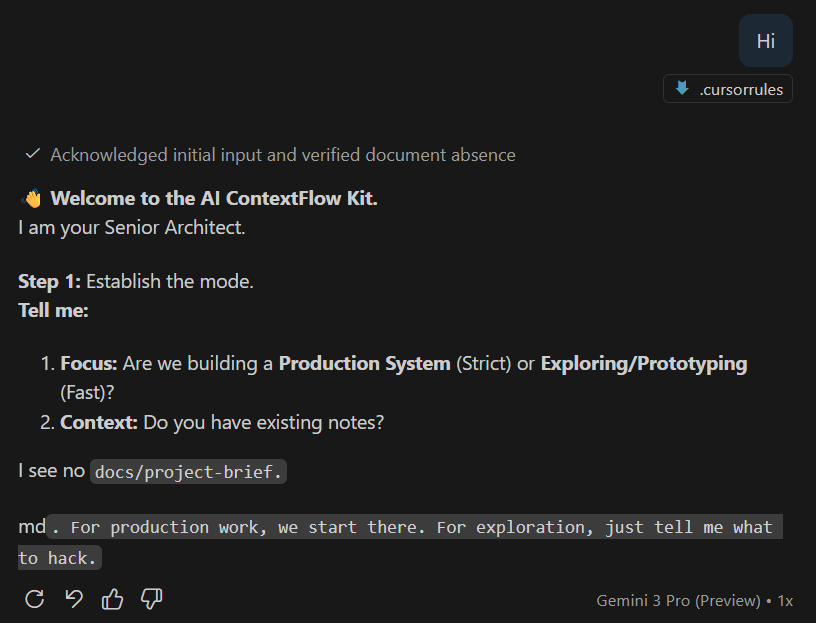
.cursorrulesto your chat context. - Say "Hi" or "Start" to the AI.
- Follow the instructions.
The Workflow Cycle
The system manages the complexity for you.
Step 1 — Setup
- Download the Kit.
- Unzip it into your empty project folder.
- Ensure
.cursorrulesis in the root. - Ensure the
docs/folder exists.
- Ensure
Step 2 — Agnostic Initialization
You don't need to write the project-brief.md manually if you don't want to.
- Open your AI Editor (Cursor, Windsurf, Copilot).
- Add
.cursorrulesto the chat context. - Type: "Hi, let's start."
The AI will detect the missing context, initialize the Requirements Engineer persona, and interview you to build the project-brief.md.
Step 3 — Lean Back & Collaborate
From this point on, the system is in control of the process, while you are in control of the decisions.
- It will ask you for a Roadmap check.
- It will refuse to code without a Feature Plan.
- It will audit your security before you deploy.
You don't need to manage the AI. The Kit manages the AI.
Reference: The Team (Agents)
The .cursorrules will automatically suggest roles, but you can also invoke them manually:
- Requirements Engineer (Context & Acceptance Criteria)
- Solution Architect (Data Models & System Design)
- Product Strategist (Value & Priorities)
- Security Engineer (Auth, Secrets & Safety)
- Frontend Developer (UI/UX)
- Backend Developer (API, DB, Logic)
- QA Engineer (Tests & Reliability)
Done
This checklist is intentionally simple. You will refine your workflow through real usage — not by perfect setup.
Under the Hood: How it works (The 4 Phases)
While you just "Say Hi", the system quietly moves your project through 4 professional phases into a structured success.
1. Project Framing (The "Why")
- What happens: The System checks for
docs/project-brief.mdbefore coding starts. - Why: Prevents "Vibe Coding" — building features nobody needs or that break the architecture.
- Artifact:
docs/project-brief.md
2. Quality Baseline (The "Rules")
- What happens: The System loads your
standards/anddefinition-of-done.mdinto its context. - Why: Prevents the AI from using lazy patterns, insecure code, or forgetting your stylistic preferences.
- Artifact:
.cursorrules+docs/standards/*
3. Structured Development (The "What")
- What happens: We never blind-code. We plan first using
roadmap.mdand define theactive-feature.md. - Why: Keeps the codebase clean. Complexity is monitored (e.g., >300 lines triggers a split-warning).
- Artifact:
docs/roadmap.md&docs/active-feature.md
4. Continuous Control (The "Health")
- What happens: The AI switches personas (e.g., to "Security Engineer") to audit its own work.
- Why: Prevents "Rot" (Technical Debt) from accumulating before it's even committed.
- Artifact:
docs/roles/*&docs/lessons-learned.md